
Error Parsing Script “ ” in FiveM (Escrow Error Explained and Fixed)
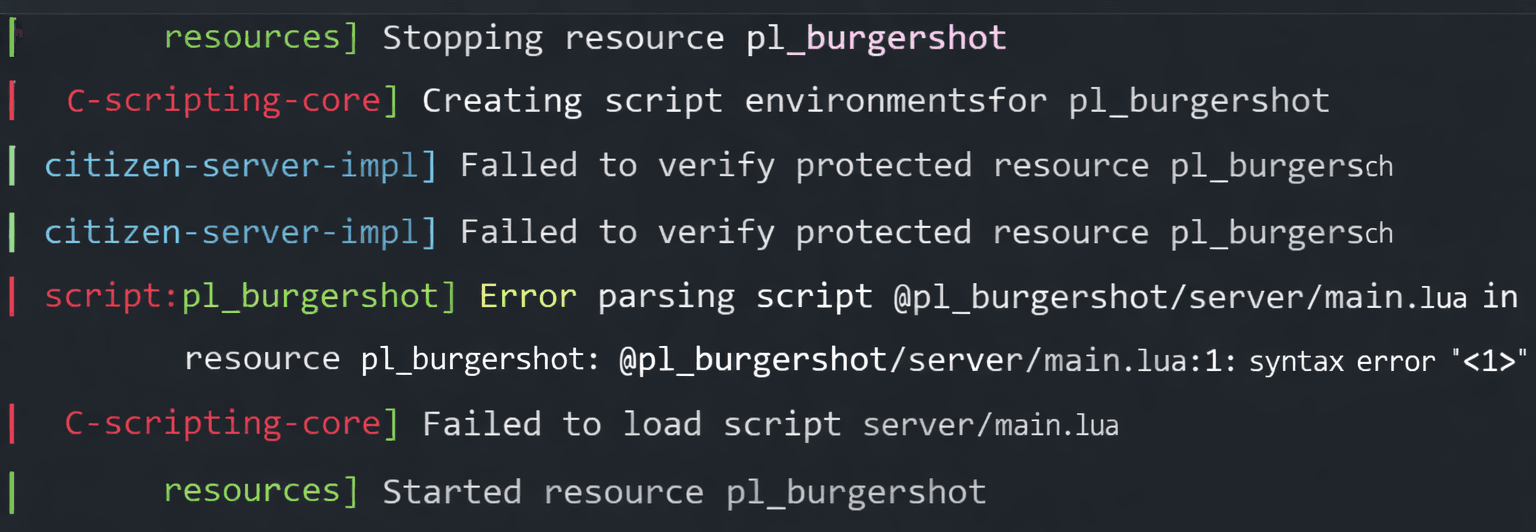
If you are running a FiveM server and see an error that looks something like:
“Error parsing script … < … >”
or
“Error parsing script <1>”
this can be confusing at first, especially if the resource worked fine before or you just installed it. Unlike entitlement errors, this one is usually not about ownership, but about how the script is being read and loaded by FiveM’s escrow system.
In this guide, I’ll explain what this error actually means, why it happens, and how you can fix it quickly without breaking your server.
What Does “Error Parsing Script <…>” Mean in FiveM?
In simple terms, this error means FiveM failed to read or decode part of an escrow-protected script.
When a resource uses FiveM escrow, some files are encrypted and verified during startup. If FiveM cannot correctly parse those files, the resource fails to load and throws a parsing error instead.
This is not a Lua syntax error you wrote yourself. It is almost always related to:
- Outdated server artifacts
- Modified escrow files
- Incomplete downloads
- File corruption during upload or extraction
Why This Error Happens
Here are the most common causes behind the FiveM escrow parsing error.
Outdated FiveM Server Artifacts
This is the number one reason.
Escrow-protected scripts rely on newer FiveM builds to decrypt and read protected files properly. If your artifacts are old, the script simply cannot be parsed.
Editing Escrow-Protected Files
Many people unknowingly cause this error by:
- Opening escrow files in a code editor
- Adding prints or debug lines
- Formatting or auto-saving files
Once an escrow file is modified, FiveM will fail to parse it.
Corrupted or Incomplete Upload
If the resource was:
- Uploaded via FTP with a failed transfer
- Partially extracted
- Zipped and unzipped incorrectly
Some encrypted files may be missing or damaged, triggering a parsing error.
Mixing Files From Different Versions
Copying files from:
- An older version of the script
- Another server
- A different framework setup
can break escrow integrity and cause parsing failures.
How Do I Fix “Error Parsing Script <…>” in FiveM?
Follow these steps in order. Do not skip steps.
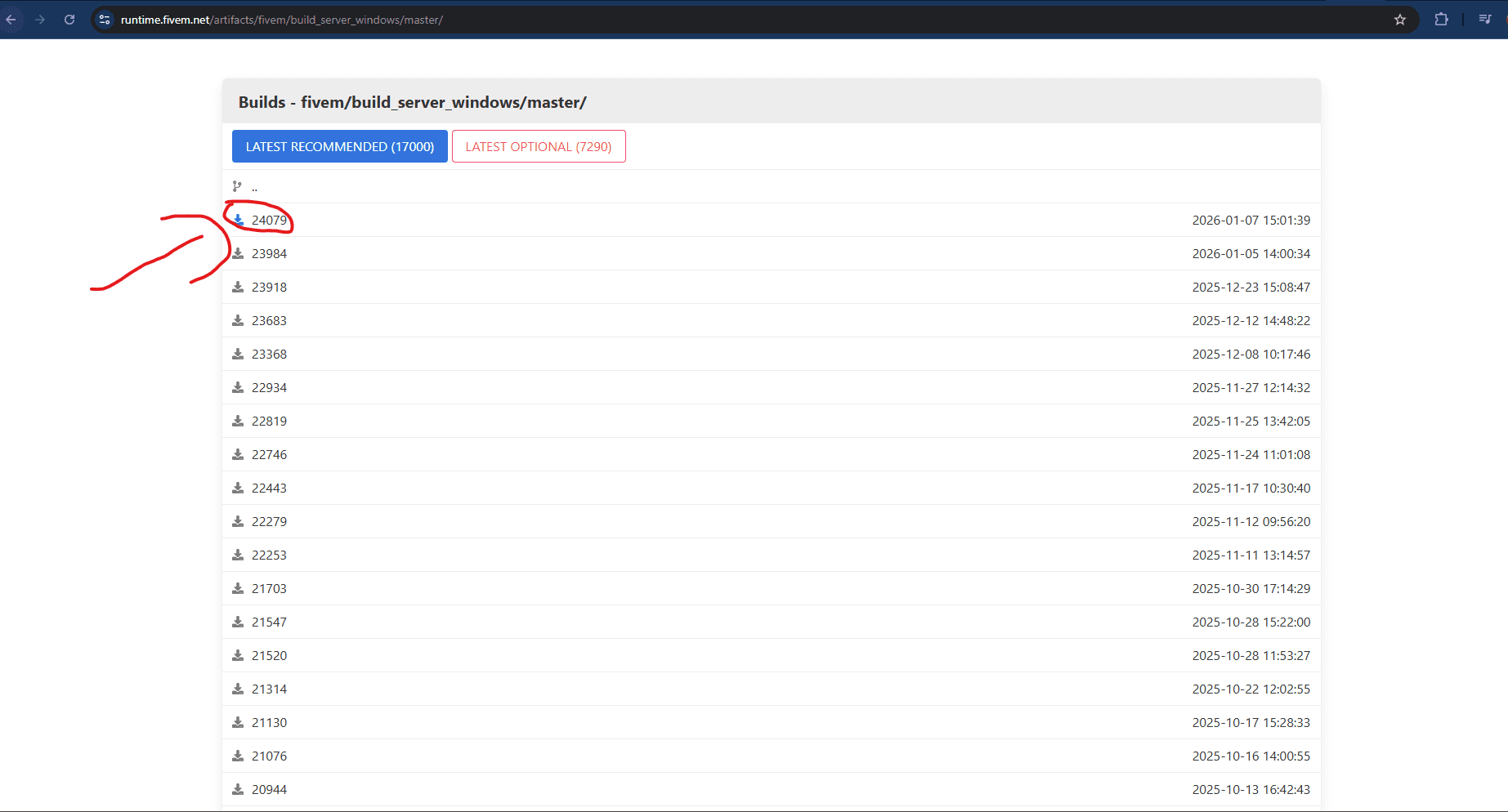
Step 1: Update Your Server Artifacts
Go to the official FiveM artifacts page and update to the latest recommended build.
After updating:
- Stop the server
- Restart it fully
- Do not just restart the resource
This alone fixes most escrow parsing errors.
Step 2: Re-Download the Script From the Portal
Do not reuse old backups.
Download the script again from:
Then upload it cleanly to your server.
Step 3: Avoid Using FileZilla to Upload Escrow Scripts
Some users have reported that FileZilla can occasionally corrupt or partially upload escrow-protected files, which may result in parsing or loading errors in FiveM.
What to do instead:
- Use WinSCP to upload your script to the VPS or hosting
- Upload the script in binary mode
- Make sure the upload completes fully before starting the server
Using WinSCP reduces the risk of broken escrow files and helps ensure the script loads correctly.
Frequently Asked Questions
Why do I get “Error parsing script <…>” when starting my FiveM server?+
This happens when FiveM cannot properly read an escrow-protected script during startup, usually due to outdated artifacts, corrupted files, or modified escrow content.
Is the FiveM escrow parsing error caused by outdated server artifacts?+
Yes, outdated server artifacts are the most common cause, as newer escrow scripts require updated FiveM builds to load correctly.
Can editing escrow-protected files cause script parsing errors in FiveM?+
Yes, even opening or formatting escrow-protected files can break them and cause FiveM to throw a parsing error.
How do I fix the “Error parsing script <…>” escrow error permanently?+
Update your server artifacts, reinstall the script from the original source, avoid editing protected files, and restart the server fully.