8
seasonal themes
5
languages
100%
open source
Highlights
What players get while they load
All of it comes with the script and is set up from one config file.
Progress that tells the truth
It follows FiveM's real loading events, not a timer. 60% actually means 60%.
A hub that fills itself in
Your newest news post and changelog version show up on the front card on their own.
Changelog and news
Versioned patch notes players can filter, plus news posts with banners.
Gallery
Screenshots and clips in categories. Players can set any shot as their background.
Music player
Playlist, shuffle, repeat and a visualizer that reacts to the track. Three songs included.
Keybinds on a real keyboard
Your binds light up on a full keyboard. Hover a key to see what it does.
Staff team
Ranks with their own colours, avatars, Discord handles and a short bio.
8 seasonal themes
Winter, Halloween, Ramadan, New Year and more. One line in the config changes the whole look.
5 languages, Arabic included
English, German, French, Spanish and Arabic, with the whole layout flipped right-to-left.
Looks like your server
Your logo, colours, tagline and character art. Swap the characters per season too.
Video or slideshow
Loop a video, play a few in a row or run an image slideshow. Never a black screen.
100% open source
Nothing is escrowed. Every Lua, JS and CSS file is yours to change.
Screenshots
See it up close
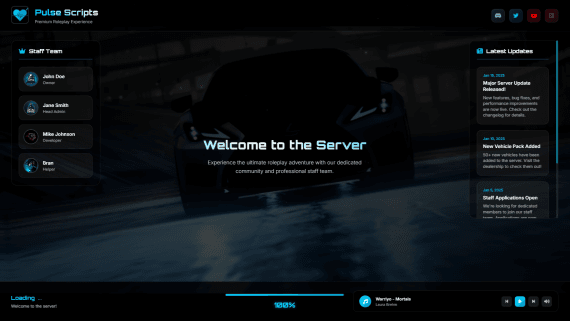
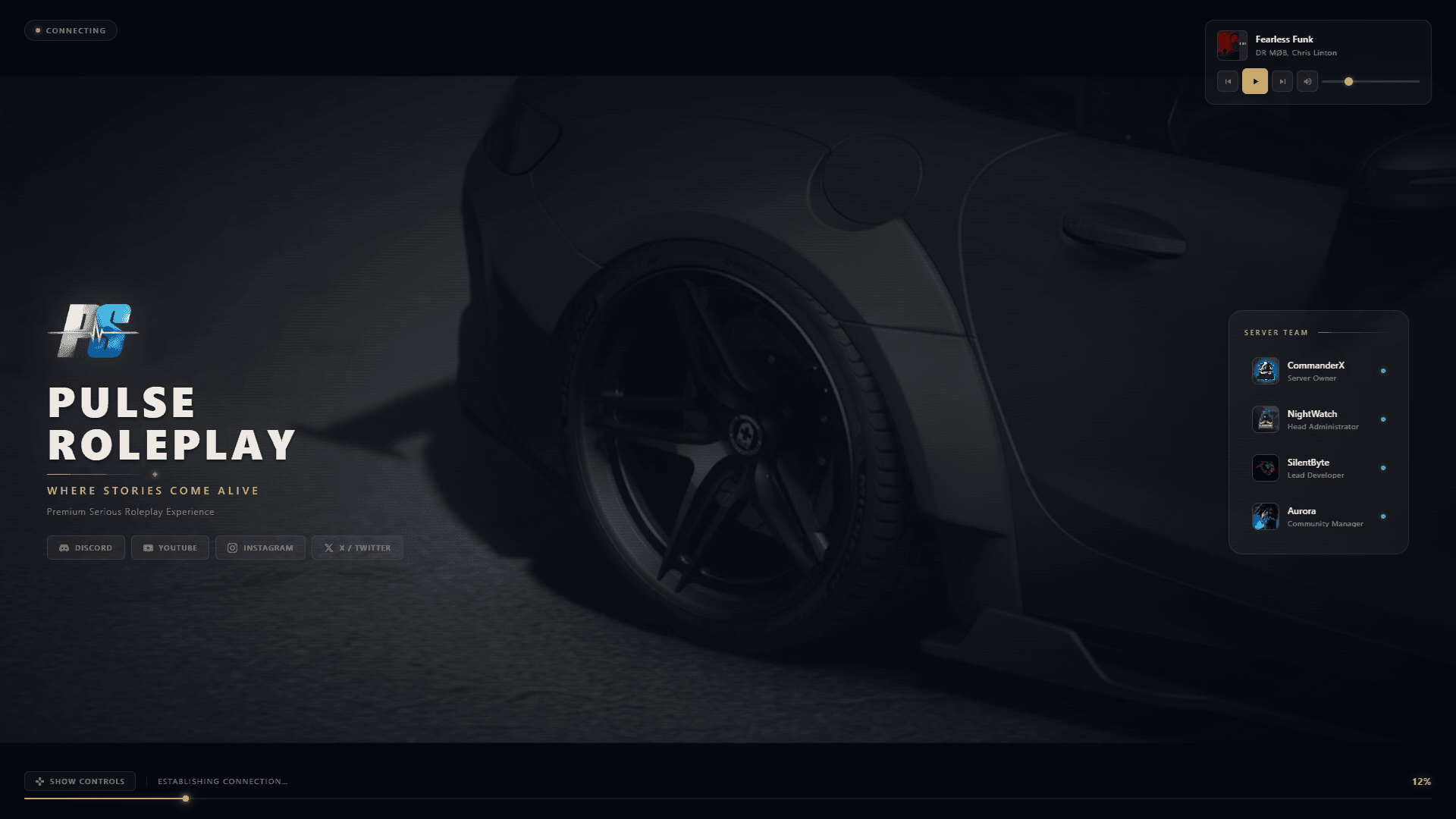
The actual loading screen at 1080p. Click any image to view it full screen.
Compatibility
Works on any server
The loading screen never talks to your framework, so there's no bridge to set up.
Framework
Languages
Background
Social buttons
The only thing it needs is pl_lib, which runs on ox_lib.Get pl_lib on GitHub
Documentation
Read the docs before you buy
Frequently asked questions
Is Loading Screen V3 really 100% open source?+
Yes. There's no escrow and no locked files. You get every Lua, JS and CSS file, so you can change anything, down to the code. There's only one version, and this is it.
Does it work with QBCore, ESX and Qbox?+
Yes, and with standalone servers too. The loading screen never talks to your framework, so it works the same on all of them. The only thing it needs is pl_lib.
Can I use my own background video?+
Yes. Convert it to WebM (VP9), drop it in the video folder and set the path in the config. If a video can't play, the screen moves on to the next one or falls back to your images, so players never get a black screen.
Will it make players wait longer to join?+
No. It shows while the game is loading anyway. The one thing to watch is file size: players download the resource before the screen appears, so keep your video under about 30 MB.
Can I add my own language?+
Yes. Copy one language file, translate it, and it shows up in the language picker. Any text you write in the config can have its own translation too.
How is it different from Loading Screen V2?+
Loading Screen V2 is free and covers the basics. V3 adds the hub, a real changelog, news posts, a gallery, real loading progress, seasonal themes, five languages and player settings. And it's fully open source.
Can I test my changes without joining the server?+
Yes. You can open the loading screen in your browser, edit the config and refresh the page to see the change. The docs explain how.
Do I get updates?+
Yes, updates are free. When a new version is out, your server console tells you on startup, along with what changed.
Is it included in the All-in-One subscription?+
Yes. Loading Screen V3 comes with every All-in-One subscription (1, 3 and 6 months), along with all our other premium scripts. Buy it on its own here, or get it with everything else through the subscription.
Full feature breakdownEvery system and supported resource in detail.
A FiveM loading screen players actually look at
Every player sits on your loading screen for a minute or more each time they join. Most loading screens give them a logo and a song. Loading Screen V3 gives them something to do: read what changed in your last update, scroll through screenshots from the city, look up the keybinds before they spawn, see who's on staff, and pick their own music.
It works on Qbox, QBCore, ESX and standalone servers, and it's 100% open source.
What's on the screen
- A hub with your newest news post and changelog version on the main card, filled in automatically
- Changelog with versions and added / changed / fixed / removed filters
- News and updates with banner images and full posts
- Gallery for screenshots and video clips, with categories and a full-screen viewer
- Music player with a playlist, shuffle, repeat and a visualizer
- Keybinds drawn on a full keyboard, with search and category filters
- Staff team grouped by rank, with avatars, Discord handles and bios
- Tips and rules that rotate under the progress bar
- Social buttons for Discord, Instagram, TikTok, YouTube, X or any link
- Player settings for language, volume, sounds and effects
Real loading progress, not a timer
The percentage follows the events FiveM sends while the game loads: core, scripts, data files, the map and joining the session. A heartbeat line fills up underneath, and the current stage is written next to it, like "Loading the map" or "Joining the city".
Make it look like your server
Set your logo, server name, tagline and two accent colours, and the whole screen follows. Character art stands on the left and right, and your server name sits behind the cards as a giant outlined word. Use a looping video, several videos in a row, or a slow image slideshow as the background.
Seasonal themes for the whole year
Fall, Winter, Spring, Summer, Halloween, Ramadan and New Year. Each one recolours the screen and adds its own decorations, like falling leaves, snow and fairy lights, pumpkins and bats, lanterns, or fireworks. Change one line in the config before the holiday and you're done.
Five languages, including right-to-left
English, German, French, Spanish and Arabic are included, and Arabic flips the whole layout. Players can switch language themselves, and anything you write in the config can be translated. Adding another language means copying one file.
Easy to set up, easy to change
Everything lives in one config file with a comment on every option. You can preview the screen in your browser while you edit, so you don't have to rejoin the server after every change. The documentation shows exactly which file and setting to change for each part of the screen.
100% open source
There's no escrow and no locked build. You get every Lua, JS and CSS file, so if something isn't in the config, you can still change it in the code.
LoadingScreen V3
A loading screen your players will actually look at. While the game loads they can read your changelog, scroll the gallery, check the keybinds, meet your staff and play music. 100% open source.
$14.99
- Instant delivery
- 100% open source
- Free updates